Your AI Chat,
Private and On Your Side.
ZeChat is a desktop chat client for OpenAI-compatible models, built around one idea: you stay in control. The agent loop runs natively in Rust (zeagentrs) inside a Tauri 2 app — it streams turns, calls tools, connects MCP servers, loads your Markdown skills, and enforces a tool firewall before anything executes. Everything lives in plain files under ~/.zechat.
An AI assistant
that answers to you.
Most AI chat apps are locked to one vendor's cloud, one vendor's model, and one vendor's rules — and your conversations live on their servers. ZeChat's answer is simple: run the agent on your own machine, connect whichever model and tools you choose, and keep a firewall between the model and anything it wants to do.
Bring your own model
Point ZeChat at any OpenAI-compatible endpoint — cloud or a local server. Save several connection profiles, fetch each one's model list, and switch models from the header. Your keys, your endpoints.
Local-first by design
No account, no telemetry, no ZeChat backend. Sessions are Markdown, settings and memory are JSON — all under ~/.zechat. The only network calls are the ones you configure.
Real tools, real actions
Rust system tools, MCP servers over stdio/HTTP/SSE, and your own Markdown skills give the model more than talk — it can call functions and act, every call routed through your policy.
A firewall you control
Ordered rules decide, per tool call, whether it runs, asks, or is blocked. Presets get you started; the simulator shows what a rule matches before you save it.
See it in Action
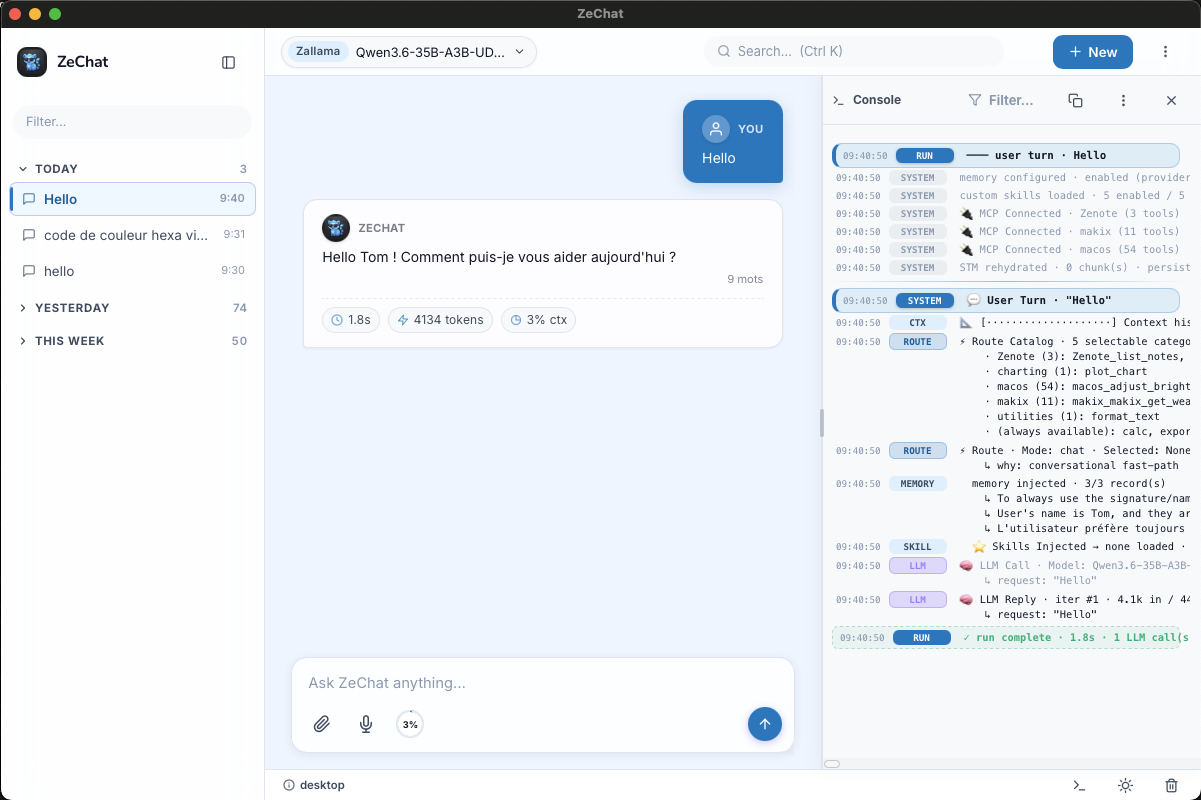
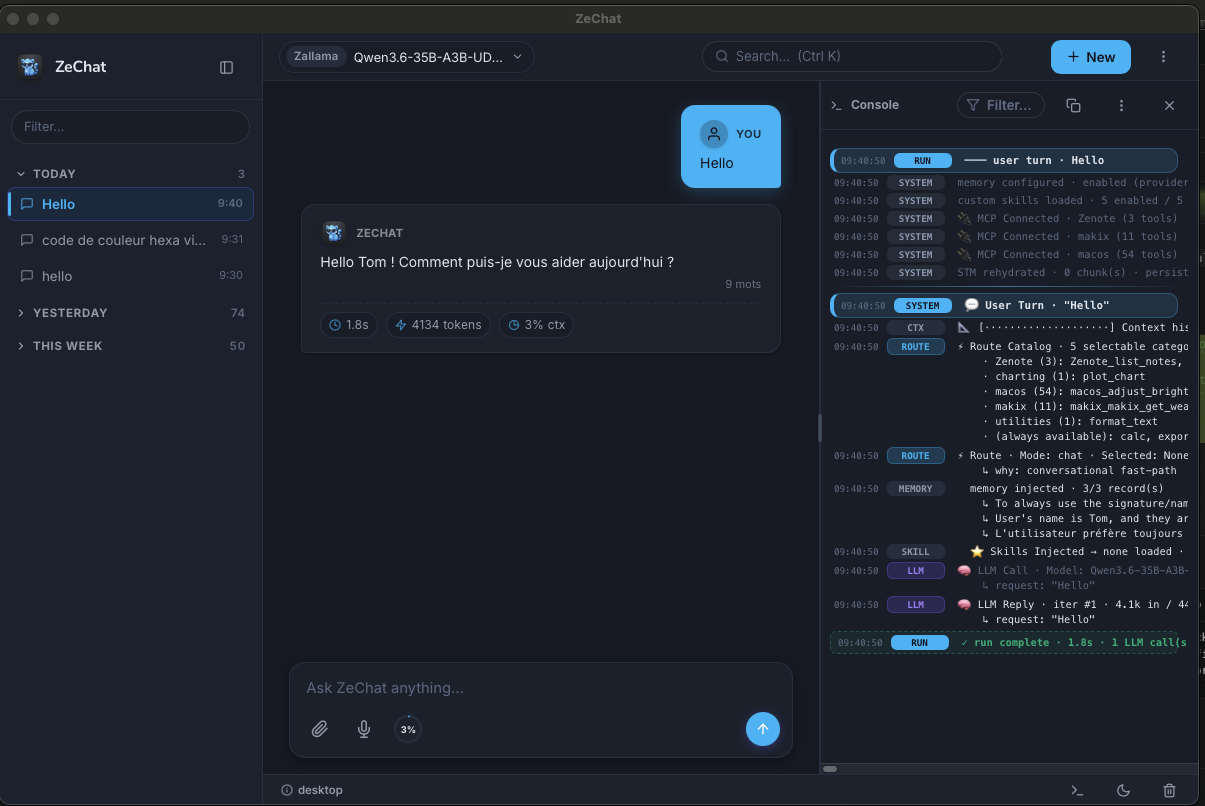
Real screenshots of the desktop app — conversation on the left, the live agent console on the right.
What ZeChat Actually Ships
No roadmap items — this is what is in the build you download.
Rust Agent Runtime
The whole agent loop lives in the Tauri backend via zeagentrs: streaming turns, routing, iteration limits, tool budgets, short-term memory and tracing — all in-process, not in the browser.
Providers & Profiles
Configure base URL, API key, model and token limits for any OpenAI-compatible provider. Keep several profiles side by side and swap model right from the header switcher.
Native MCP Servers
Connect stdio, HTTP and SSE MCP servers with optional bearer/header auth and a per-call timeout. Inspect the tools each one exposes and enable or disable them individually.
Tool Firewall
Ordered rules match a tool name (glob or regex) and optionally its arguments, then accept, ask, or deny. Four presets, live simulation, and an in-app approval prompt when a call needs you.
Built-in System Tools
Date/time, a real expression calculator, random & dice generation, and media-library access ship in Rust and are always registered. Chart plotting and text formatting can be toggled per tool.
Memory Center
Durable facts are reflected out of conversations and injected into later turns, stored per provider/profile under ~/.zechat/memory — readable, editable, deletable.
Live Agent Console
A filterable trace panel shows every step of a run — system startup, route catalog, memory injection, skills loaded, each LLM call and tool result, with timings and token counts.
Skills Center
Write skills as plain Markdown files in ~/.zechat/skills. Create, inspect, import, export, enable or disable them — with a token-cost estimate before you turn one on.
Vision & PDFs
Attach images or whole PDFs — pages are rasterized locally with pdf.js and sent to your vision model, with progress shown as each page is processed.
Voice In & Out
Dictate prompts with microphone transcription and have replies read back with text-to-speech, plus ambient thinking sounds while the agent works.
Vault & Media Library
Sessions as Markdown, attachments and generated artifacts in a browsable library — all plain files under ~/.zechat. Back it up like any other folder.
CLI Parity
The same binary answers from a terminal: zechat ask "…" shares the session builder, tools, prompt, firewall, MCP config and memory with the UI — no GUI/CLI drift.
One Catalogue,
Every Tool You Grant It.
ZeChat's Rust system tools, your enabled MCP servers, and your Markdown skills are merged into a single route catalogue at the start of every turn. A few core tools are always available; the rest are grouped into selectable categories so a large tool surface never floods the model's context.
MCP tools are namespaced by their server (zenote_list_notes), so two servers can both expose create_note without colliding.
- Call real functions — files, notes, APIs, whatever a server exposes.
- Chain tools together across iterations, inside a tool budget you set.
- Ask permission first, because every call passes through the firewall.
Large tool results are offloaded to short-term memory chunks instead of being pasted into context — the agent can re-read or export them later.
Always available
get_current_time
+ get_current_datetime
calc
trig · logs · stats · roots
random_generator
numbers · UUIDv4 · dice
list_media · read_media
+ view_media · export_chunk
Selectable categories
charting (1)
plot_chart
utilities (1)
format_text
Zenote (3)
zenote_list_notes · …
makix (11)
makix_get_weather · …
macos (54)
macos_adjust_brightness · …
Add MCP server…
stdio command, HTTP or SSE endpoint
How to add an MCP server
-
1
Open
Tools & MCPand add a server: give it a name and pick a transport — a stdio command with arguments, or an HTTP/SSE URL with optional bearer-token or custom-header auth. Set a per-call timeout so a slow server can't hang a turn. - 2 Hit Test connection. ZeChat spawns or dials the server, lists its tools, and caches them — you can then untick any tool you don't want exposed to the model.
-
3
Set your policy in the
Firewall Center— accept safe reads, ask before writes, and deny anything the agent should never touch.
A stdio server
Name       Zenote
Transport  stdio
Command    npx
Arguments  -y @zafiamy/zenote-mcp
Timeout    30000 ms
A remote HTTP server
Name       makix
Transport  http
URL        https://mcp.example.com/mcp
Auth       bearer <token>
Timeout    30000 ms
Server definitions live in ~/.zechat/settings/, so the CLI connects to exactly the same servers as the UI.
Confirm destructive actions
(^|_)(delete|remove|destroy|drop|rm)(_|$)
Confirm writes
(^|_)(write|create|update|edit|save)(_|$)
Block shell / exec
(^|_)(exec|shell|bash|command|spawn)(_|$)
Allow reads & searches
(^|_)(get|read|list|search|find)(_|$)
Allow this tool call?
The agent wants to run zenote_create_note — matched “Confirm writes”: modifies files or state.
Agentic Power,
Without the Blind Trust.
An agent that can act is only as safe as the guardrails around it. The Firewall Center runs an ordered list of rules against every tool call — matching the tool name and, if you want, its arguments — and the first match wins.
- Accept — trusted calls run silently, no interruptions.
- Ask — risky calls pause for a one-tap approval in the chat.
- Deny — blocked before the tool is ever invoked.
Start from a preset — Trusted, Balanced, Guarded or Lockdown — then tune it. Patterns are written as friendly globs (write_*) or raw regex, and a simulator shows which of your real tools each rule would catch before you save.
The same policy is enforced in the UI and the CLI — it is translated once into the Rust runtime's rules.
Heavy Lifting in Rust,
A Frontend With No Build Step.
The backend links zeagentrs and owns sessions, streaming, tools, MCP, the firewall, budgets and memory. The UI stays deliberately thin: framework-free zesdk modules served straight from src/, no bundler, no build step.
- One file per feature — chat, settings, MCP, firewall, skills, library.
- Native IPC — the UI creates Rust-backed sessions and renders the stream.
- Same runtime in the CLI, so behaviour never forks between the two.
Run the desktop app in dev mode
npm install
npm run desktop:dev
Build a standalone binary
./build.sh linux      # build/zechat
./build.sh macos      # build/zechat-macos
./build.sh windows    # build/zechat-x64.exe (cross-compiled)
Ask from the terminal
zechat ask "Summarize the project architecture"npx zeapp serve --open serves the frontend in a browser-only shell — handy for UI work, but the full agent needs the Tauri build because the runtime lives in Rust.

Download ZeChat
Free, no account, no sign-up. Bring your own OpenAI-compatible endpoint, install, and start chatting — everything stays on your machine.
Windows
Coming soon
Linux
Coming soon
macOS
Coming soon
./setup-linux.sh on Linux, ./setup-macos.sh on macOS.